


Wireless Reverse Charging
3.910.00 Reviews
App Specs
- Version
- 2.0
- Updated On
- License
- Free
- Downloads
- 50,000+
- Developer
- Boss Inc
- Categories
- Libraries & Demo
- Platform
- Android
Screenshots
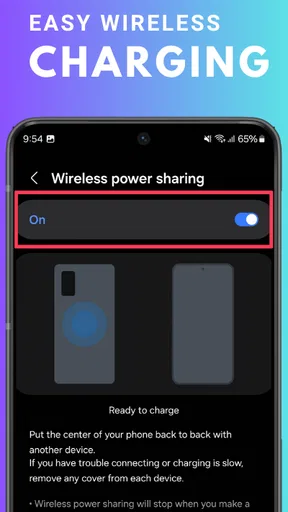
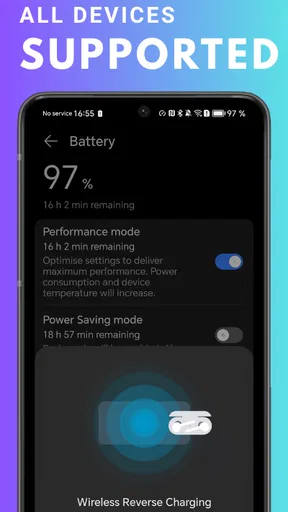
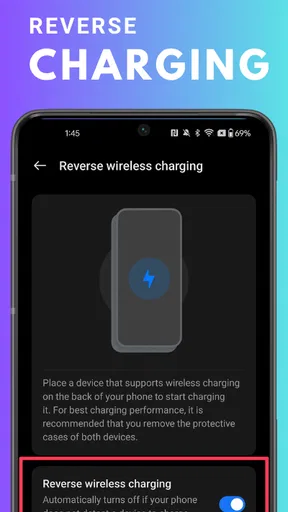
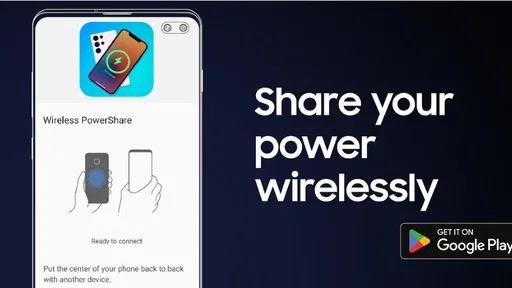
 Analysis by AppCompare
I approach Wireless Reverse Charging with one practical question: can someone quickly understand what it does and decide whether it fits their needs? It is an app in the Libraries & Demo category from Boss Inc, and its central idea is phone-to-phone power sharing. The concept sounds simple, but it depends on compatible hardware and careful placement, so clear expectations matter as much as the feature itself.
For a person who has never used reverse charging, the app’s name points toward a specific task rather than a broad toolkit. That focus can be helpful when you are looking for information about sharing battery power, but it also means the experience is most relevant to people who already own a phone capable of sending power wirelessly. I would treat it as a guide or demonstration around a hardware-dependent feature, not as a substitute for a charging pad or an extra battery.
Understanding the idea and the app
I use this opening section to set a realistic frame for the app: it concerns a phone feature, but the useful first step is understanding what the app can help you explore and what depends on the handset itself. That distinction makes it easier to judge whether it belongs in your routine before you try a power-sharing setup.
Readability and navigation: a focused starting point
The app is free, rated for Everyone, and currently at version 2.0. Those details make it approachable for a broad audience, while its Libraries & Demo classification suggests a utility-oriented experience rather than a game or a general phone-management suite. Its average rating is 4.1 from around 500 ratings, and it has over 10,000 installs, so there is a modest but established audience for the idea.
In my view, the most useful way to judge an app with this subject is not by expecting it to make every phone charge another device. The important question is whether it helps you understand the feature and its practical conditions. If you are new to reverse charging, begin by checking your own phone’s settings and manufacturer guidance; that tells you whether the hardware function exists before you spend time trying to use it through an app.
A clear workflow matters here because reverse charging is easy to misunderstand. People may assume that installing an app is enough to turn any handset into a wireless power source. It is not a safe assumption: the phone itself must support the relevant capability. I would keep that distinction in mind when exploring the app, especially if you are helping a family member who may interpret an app’s name as a promise of universal compatibility.
Motor and sensory considerations: the physical part of charging
Wireless power sharing is not entirely hands-free. The two devices have to be placed back to back and aligned well enough for charging to begin, which can take a little adjustment. That small physical step may be easy for some people and frustrating for someone with limited dexterity, tremor, or difficulty holding two phones steady. A table or another flat surface can make the process less awkward than balancing both devices in your hands.
Worth Reading Before You Choose

EA SPORTS FC Mobile 26 Is a Bigger Football Game, but It Takes Time

Flipboard Shows What News Apps Must Do Beyond the Feed

Switching to Android Auto Means Rethinking Your Driving Routine

Google Calendar Makes a Crowded Week Easier to Manage

Ludo King Makes the Most of the Minutes Between Plans

Baby Panda World Brings Quick Play to Modern Phones, but Its Game Library Feels Busy
There is also a sensory and practical trade-off: the donor phone loses battery while helping another device, and wireless charging can create warmth. I would use it as a short-term boost rather than leaving two devices pressed together unattended or treating it as a dependable all-day charging plan. If either device becomes uncomfortably warm, stopping and letting it cool is the sensible choice.
For someone with low vision, the physical alignment may be harder than understanding the concept. A familiar audio or vibration cue on the phone being charged may help, if that device provides one, but I would not count on a visual indicator alone being easy to notice in bright light or while travelling. A quiet place and a stable surface make it easier to check whether charging has actually started.
Situational access: when sharing power helps
The app’s subject is easiest to appreciate in a genuine low-battery moment. Imagine waiting for a pickup after a long day: your companion’s phone is nearly out of power, and you need both phones available for messages and directions. If your handset supports reverse charging and has enough battery to spare, a brief transfer may help the other person stay reachable until you can get to a proper charger.
Small accessories are another sensible use case. Earbuds or a watch can need less immediate attention than a phone that is about to shut down, so sharing a little power with them may be a reasonable choice while you are away from an outlet. I would still consider what you need your own phone for first. If you rely on it for navigation, medical communication, work calls, or an emergency contact, preserving your own battery should take priority over helping another device.
Compared with a cable, reverse charging avoids carrying or finding a connector, but it is slower and relies on precise positioning. Compared with a power bank, it does not provide a separate reserve: it transfers energy from a phone you may need yourself. A wall charger or dedicated battery pack is the better choice when you need a predictable, longer charge. This app’s topic is most useful for understanding an occasional convenience, not replacing those dependable options.
Remaining barriers: compatibility and realistic expectations
The main barrier is compatibility. The donor phone needs reverse wireless charging support, and the receiving device must be suitable for wireless charging. Even when both conditions seem likely, cases, camera bumps, or the placement of charging coils can make alignment awkward. If charging does not begin, I would first remove anything bulky between the devices, reposition them on a flat surface, and check the phone’s settings rather than repeatedly shifting them in a hurry.
Another limitation is the energy trade-off. A phone that is already low on charge is a poor candidate for sharing power, and a brief transfer may not restore enough battery to make a major difference. Think of it as a bridge to the next outlet, not a way to refill a drained phone. That expectation helps avoid the frustrating situation of sacrificing your own battery for a result that is only temporary.
People who need a large, reliable charge, use a phone without the required hardware, or cannot comfortably position the devices should skip this approach and choose a cable, charging pad, or power bank that suits their situation. The app is also less relevant if you rarely lend power or already carry a dependable charger. Its value is tied to a particular capability, so it will not be equally useful to every smartphone owner.
Inclusive verdict: useful when the conditions are right
I see Wireless Reverse Charging as a focused option for people who want to explore or make sense of sharing a phone’s battery with another device. The app is free, and its Everyone rating makes it suitable for a wide audience to consider, but practical access still depends on a compatible phone and a manageable physical setup. The developer is Boss Inc, and the app’s current version is 2.0.
My recommendation is conditional: it is worth considering if you have compatible hardware and want an occasional backup for earbuds, a watch, or another phone. It is not the right choice if you expect fast charging, universal support, or a replacement for a charger you can rely on. For an inclusive experience, the strongest approach is to check the phone’s capability first, work on a stable surface, and keep a conventional charging option available for situations where alignment, battery level, or dexterity becomes a barrier.
Ever been stuck with a dying phone battery and no charger in sight? Enter Wireless Reverse Charging, a nifty feature that’s changing the game for smartphone users everywhere. Let’s dive into what it is, how it works, and whether it’s worth your time.
What is Wireless Reverse Charging?
Imagine using your phone to charge another device wirelessly. That’s the magic of Wireless Reverse Charging. It’s like your phone becomes a portable charging pad, sharing its juice with other compatible devices. Perfect for those moments when your friend’s phone is about to die, and you want to be the hero of the day.
How Does It Work?
Most of us are familiar with wireless charging – you place your phone on a charging pad, and voilà, it starts charging without any cables. Reverse charging flips this concept. Your phone becomes the pad, and the other device, be it another phone, earbuds, or a smartwatch, draws power from it.
To get started, you usually need to enable the feature in your phone’s settings. Once activated, you place the device you want to charge on the back of your phone, and the charging begins. It’s pretty straightforward, right?
When Can It Be Useful?
Picture this: you’re on a road trip, and your friend’s phone is dying. You whip out your phone, activate reverse charging, and save the day. It’s also handy for charging smaller devices like wireless earbuds or smartwatches on the go.
Plus, if you’ve got a power bank of a phone (you know, those with massive battery capacities), sharing some of that power isn’t going to hurt. You’re essentially a walking power bank, spreading the love and keeping everyone connected.
Performance and Efficiency
Now, let’s talk about efficiency. Don’t expect lightning-fast charging speeds. Since it’s wireless, it’s inherently slower than using a cable. It’s more of a convenience feature, something to use in a pinch rather than relying on regularly.
It’s also worth noting that using this feature will drain your battery faster, so it’s a bit of a balancing act. You want to help out, but not at the expense of your own battery life. It’s all about finding that sweet spot.
Is It Safe?
Safety first, right? The good news is that most devices with Wireless Reverse Charging are designed with safety measures. They typically include features that prevent overheating and overcharging. However, it’s always a good idea to use it in moderation and be mindful of your device’s temperature.
Compatibility and Limitations
Before you get too excited, check if your phone supports this feature. Not all devices have it, and the ones that do might only work with certain other devices. It’s a bit of a tech jungle, but most modern flagship phones are jumping on the bandwagon.
Another thing to consider is the positioning. You need to align the devices correctly for the charging to start. It might take a bit of fiddling, but once you get the hang of it, it’s pretty straightforward.
The Verdict
So, is Wireless Reverse Charging a must-have? It’s certainly a cool feature, offering convenience and a bit of tech magic. It’s not going to replace your regular charger, but it’s a handy tool in your tech arsenal.
If you’re someone who’s always on the go and loves being prepared for any situation, this could be a game-changer. Just remember to keep an eye on your own battery level, and you’ll be the savior in any drained battery scenario.
In conclusion, while it’s not a necessity, it’s definitely a nice-to-have feature. Whether you use it to help a friend or keep your own gadgets topped up, Wireless Reverse Charging adds a layer of versatility to your smartphone. Give it a try, and you might just find it’s the tech companion you didn’t know you needed.
Pros
- Convenient for on-the-go charging.
- Supports multiple device types.
- Easy to set up and use.
- No additional cables needed.
- Reduces clutter and travel weight.
Cons
- Drains phone battery quickly.
- Limited to compatible devices.
- Charging speed may be slow.
- Requires close proximity.
- Can generate excess heat.
FAQs for Wireless Reverse Charging
What is Wireless Reverse Charging and how does it work?
Wireless Reverse Charging is a feature that allows your smartphone to act as a power source for charging other devices wirelessly. By enabling this feature, you can place another device, such as earbuds or a smartwatch, on the back of your phone to share its battery power without needing cables.
Which devices are compatible with Wireless Reverse Charging?
Compatibility varies by device and manufacturer. Generally, devices that support Qi wireless charging can be charged using Wireless Reverse Charging. It's essential to check your phone's specifications and the device you intend to charge to ensure compatibility before use.
Does using Wireless Reverse Charging affect my phone's battery life?
Yes, using Wireless Reverse Charging can drain your phone's battery more quickly as it transfers power to another device. It's advisable to use this feature sparingly and ensure your phone is sufficiently charged, especially if you rely on it throughout the day.
How do I activate Wireless Reverse Charging on my smartphone?
Activation methods vary by device. Typically, you can enable Wireless Reverse Charging through the settings menu under battery options or connectivity settings. Some phones also offer a quick toggle in the notification shade for fast access. Refer to your device's manual for specific instructions.
Are there any safety concerns with using Wireless Reverse Charging?
While generally safe, it's important to ensure both devices are placed correctly to avoid overheating. Avoid using Wireless Reverse Charging in extremely hot environments and always use devices that are designed to be charged wirelessly to prevent damage.


